
Legacy FAQs
Answers to frequently asked questions when integrating to Leonardo.Ai via API
Models
What is the model ID of PhotoReal?
PhotoReal v1 does not have a model ID.
To use PhotoReal on the Production API, you need to remove the modelId parameter and enable the photoReal flag.
For an example, check out the Generate Images Using PhotoReal sample recipe.
PhotoReal v2 requires Leonardo Kino XL, Leonardo Diffusion XL or Leonardo Vision XL models. See here for a sample request.
Can I use my custom model with the Leonardo API?
Yes, you can use your own custom model with the Leonardo API.
How do I find my custom model ID?
On the Leonard App, navigate to the Finetune Models. Click on the Your Models tab. Click on the model, then click on View More. This should reveal the Model ID of that particular custom model.

Generating Images
How do I use Alchemy v2 on the API?
Alchemy V2 works with SDXL models like Leonardo Vision XL, Leonardo Diffusion XL, AlbedoBase XL and KinoXL. To use Alchemy v2, choose an SDXL model and simply set the alchemy parameter to true. This setup will use Alchemy v2.
Why is my guidance scale setting not reflected?
The guidance scale is an advanced parameter and Leonardo advises to use a guidance scale of 7 in most cases.
There are some default behaviours and conditions applied when trying to control the guidance scale. The conditions and logic are as follows:
- If not set, guidance scale default is 7.
- If not using Alchemy, guidance scale is limited to 1-20.
- If using Alchemy but not using an SDXL model, guidance scale is limited to 2-30.
- If not using Alchemy and scheduler is set to LEONARDO, guidance scale is capped at 7.
How do you set Prompt Magic V3 to RAW mode using the API?
To set Prompt Magic V3 to RAW mode, set"highContrast": false. This is similar to enabling RAW mode on the Leonardo app.
How do you set Alchemy's Resonance using the API?
To set Alchemy's resonance, use the guidance_scale parameter. This controls the resonance setting on the UI.
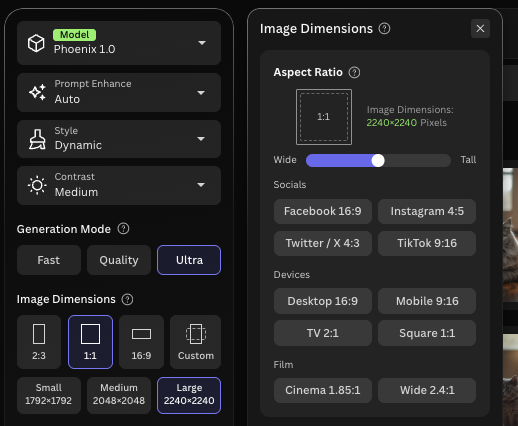
Why is the output image bigger than the height and width I specified?
The input resolution is not always equal to the output resolution. When you use Alchemy and high resolution, the output resolution could be bigger by 1.5x, 1.75x, 2x, etc. compared to the input resolution due to upscaling built in to this features. For example, when using Alchemy v2, the output dimension is 1.75 times bigger. When using Alchemy v1, the output is 1.5 times bigger. When using Alchemy v1 and high resolution, the output is twice the input.
To check, you can observe this in the Leonardo web app as the following image.
Generating Motion
Why am I seeing Service Error when generating SVD motion?
Although Service Erroris a generic error message, in this scenario, the error is commonly due to incorrect IDs being used. Ensure that the ID is not the generationIdfrom the Create a Generation of Images API., but rather the Image Id from Get a Single Generation.. The generationId needs to be passed to Get a Single Generation. , and the returned image Id can then be used in the Create SVD Motion Generation API.
API Credits
Why is the cost of generating images different using API credits vs Web Tokens?
Charges are calculated differently for API calls compared to generating using Web Tokens from the Web App, resulting in variations in costs. Additionally, API credits do not expire, whereas Subscription Tokens have a limited validity period.
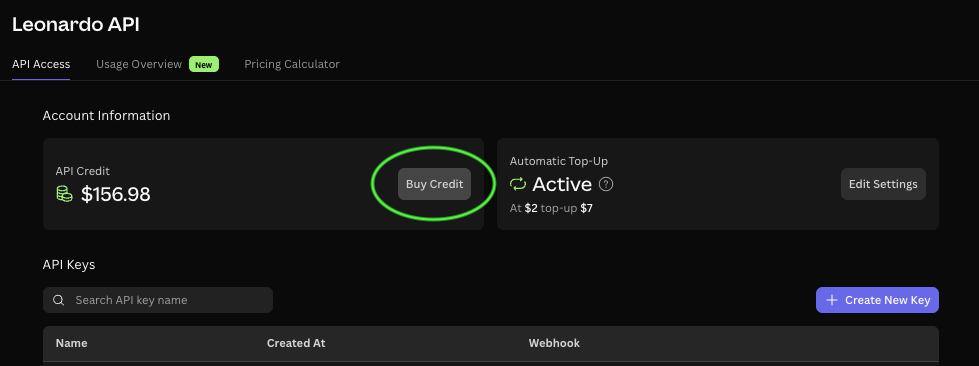
How do I top up my API plan with more API credits?
You can buy instant top up API credits via the Leonardo.Ai app. Navigate to API Access on the left side menu, click on Production API tab, and click on the Top-up Credits button.
Do API Credits expire?
No, API Credits do not expire. However, note that you can only use your API credits when you have an active API Plan Subscription.
I still have credits why can't I make anymore API calls?
Please ensure your API plan is active as you won't be able to access your credits without being on an API Plan.
My API credit balance is negative, is that normal?
Yes, it's normal for API credits to go negative.
Blocking your usage once you run out of API credits is not a precise process. There are expected ways you could get to negative but our system won't let you get too far with a negative API credit balance.
Note that the negative API credits will be deducted from the next API credit top-up. To avoid running out of credits, plan your usage or set up auto top-ups.
Do I still get charged credits if my generation failed?
If you got charged credits but your generations failed via API, the credits will get refunded back into your account.
How do I find the invoice for my API subscription plan?
We use Paddle.com for our payment system, please head over to https://paddle.net/ and enter your email to locate your receipt. A copy of your invoice would also have been sent to your email automatically after payment.
API Admin
Where did the User API key go?
The User API key is now a deprecated feature and has been replaced by the Production API key. This key can be used for all API endpoints and can be generated here. Existing User API keys still work, but new ones need to be generated as Production API keys.
Updated 8 months ago