
General FAQs
Answers to frequently asked questions when integrating to Leonardo.Ai via API
Models
What models are available on the API?
Find model specific implementation details:
- Browse our Generation guides where each model has a dedicated guide with parameters, examples, and best practices.
- Use the Get API Code feature in the Leonardo app - generate with your model, then click "Get API Code" to see the exact implementation (learn more)
Where can i find list of common API values?
Please refer to this list to find commonly used API values.
Where do I find the model ID of a specific platform model?
There are a number of ways to find Leonardo.Ai's platform model IDs
- Use this List Platform Models endpoint to list out all Platform models. You'll find all the public models available with the id, name and description
- Use the Get API Code feature in the Leonardo app - generate with your model, then click "Get API Code" to see the exact implementation, including Model ID (learn more)
- Another way is to navigate to the Leonardo App, and select Finetune Models. Click on the Platform Models tab. Click on the model, then click on View More. This should reveal the Model ID of that particular model.
Can I use my custom model with the Leonardo API?
Yes, you can use your own custom model with the Leonardo API.
How do I find my custom model ID?
On the Leonard App, navigate to the Finetune Models. Click on the Your Models tab. Click on the model, then click on View More. This should reveal the Model ID of that particular custom model.

Generating Images
When I call the Get a Single Generation API, the images URL array is empty "generated_images": []
When the Get a Single Generations API endpoint's response is empty (i.e. "generated_images": []) like below, the reason is that the generation is not yet finished. You can confirm that by looking at the status parameter which will say PENDING.
{
  "generations_by_pk": {
    "generated_images": [],
    ...
    "status": "PENDING",
    ...
  }
}
Image generation takes a few seconds so you would need to implement a wait and retry logic until status says COMPLETE or FAILED.
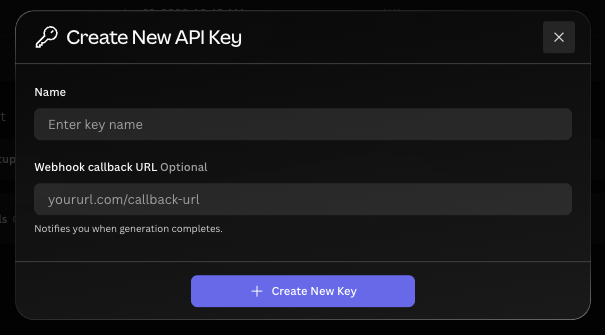
Alternatively, Leonardo.Ai has a webhooks feature. You can specify your own webhook during API key creation. Once your image is complete, Leonardo.Ai will make a call to your webhook containing the image URLs. You can learn more about that in this Best Practice guide: Guide to the Webhook Callback Feature.
How do I specify the number of Images in my generation?
Use the parameter "num_images"in your API body. For example, to generate 1 image only, your API body could look like this
{
  "height": 512,
  "modelId": "6bef9f1b-29cb-40c7-b9df-32b51c1f67d3",
  "prompt": "An oil painting of a cat",
  "width": 512,
  "num_images": 1
}
How often should I be polling for image generations?
Instead of polling, the best practice is to set your webhook callback so that Leonardo.Ai can notify you when to fetch your generation.
You can set your webhook callback URL and authentication details when creating a new Leonardo.Ai Production API key.
Do my images expire after generating via the API?
No, images generated via the Leonardo.Ai API will not expire and can also be accessed from the Web App at any time.
Generating Motion
Why am I seeing Service Error when generating SVD motion?
Although Service Erroris a generic error message, in this scenario, the error is commonly due to incorrect IDs being used. Ensure that the ID is not the generationIdfrom the Create a Generation of Images API., but rather the Image Id from Get a Single Generation.. The generationId needs to be passed to Get a Single Generation. , and the returned image Id can then be used in the Create SVD Motion Generation API.
Uploading Images
How do I upload an image for image to image?
Use the Upload Init Image API. This endpoint will return an image ID that you input to init_image_id in the Create a Generation of Images API.. Ensure that if you are using init_image_id, that you also include isInitImage:true.
Follow this recipe for a step by step guide on uploading images to use with image to image guidance.
How to upload an image for image prompt?
Use the Upload Init Image API. This endpoint will return an image ID that you input to imagePrompts in the Create a Generation of Images API.
Follow this recipe for a step by step guide on using image prompts.
Note: that the parameter imagePrompts accepts an array of image IDs as a string.
Example 1: One image prompt:
imagePrompts: [“XXXXXXXX-XXXX-XXXX-XXXX-XXXXXXXXXXX1”]
Example 2: Two image prompts:
imagePrompts: [XXXXXXXX-XXXX-XXXX-XXXX-XXXXXXXXX111, XXXXXXXX-XXXX-XXXX-XXXX-XXXXXXXXX222]
What is the extension parameter in the Upload Init Image API?
The extension parameter in the Upload Init Image API is the file extension of the image you want to upload. Examples of file extensions are png, jpg, jpeg, or webp only. The extension parameter will not accept the full filename or some binarized image data.
What’s the difference between init_generation_image_id versus init_image_id?
init_generation_image_id accepts the image ID of images generated on Leonardo.Ai. These image IDs are returned by API endpoints like the Get Generations by User ID and Get a Single Generation.
init_image_id accepts the image ID returned by the Upload Init Image API endpoint.
Variations
How do I upscale an image via API?
To upscale an image via API, use the Variation: Create Upscale API. This Upscale will apply 'Creative Upscale' to your image.
How do I get the image ID for transforming like upscale and unzoom?
You can get the image IDs via the Get a Single Generation or Get generations by user ID API endpoints. These return an array of URL links to images together with an id attribute. Thatidattribute is the image ID.
Integrations
Does Leonardo have official SDKs?
The following are Leonardo.Ai's official SDKs.
Does Leonardo have a Unity Plugin?
No, Leonardo.Ai does not have an official Unity Plugin. Please reach out via our support or contact form to inquire for alternatives.
Does Leonardo have an integration with third party integration apps?
Yes, Leonardo.Ai have an integration with Pabbly Connect and Make.com please reach out to these third party apps if you have any questions on how to use it.
API Admin
Where did the User API key go?
The User API key is now a deprecated feature and has been replaced by the Production API key. This key can be used for all API endpoints and can be generated here. Existing User API keys still work, but new ones need to be generated as Production API keys.
Do I have a limit of API Keys I can create?
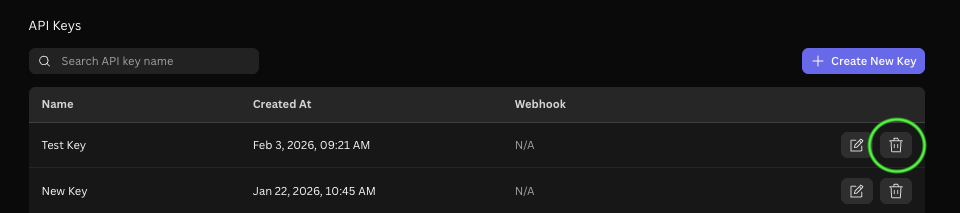
There is a limit of 10 API keys per account. To delete your existing API keys if you don't need it anymore, head to your API Access tab and select Delete.
How can I delete my API Account?
Your Production API account is linked to your Leonardo AI web account. This means there isn't a separate option to delete only the API account.
When you delete your Leonardo AI account, your API account is also scheduled for deletion. Once deletion is complete, your data is permanently removed and cannot be recovered.
Updated 8 months ago